Introduction
Freight brokers and 3PLs running TMS and accounting systems as separate silos know the drill: someone exports a report, reformats it in Excel, re-enters the data into a second system, and hopes nothing slips through the cracks. Meanwhile, invoices sit in a queue, carrier settlements age, and the finance team has no real-time view of transportation spend.
The scale of what's at stake makes this more than an IT inconvenience. According to CSCMP's 36th Annual State of Logistics Report, transportation accounts for 64.4% of total US business logistics costs — a category so large that even a 1% billing error rate compounds into material losses fast.
This guide covers the full integration picture:
- Why disconnected systems create financial risk
- What data needs to move between platforms
- How integrations are built and what they require
- Which accounting platforms work best with TMS solutions
- Common integration failure points and how to avoid them
Key Takeaways
- Siloed TMS and accounting systems force manual reconciliation that costs hours weekly and creates real financial risk
- Integration methods include native connectors, open APIs, and middleware platforms — each suited to different levels of complexity and flexibility
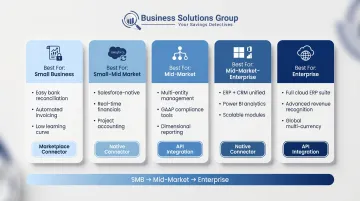
- QuickBooks suits small-to-midsize freight operators; NetSuite and Sage Intacct serve larger, multi-entity operations
- Real-time data sync enables accurate credit limit checks and cash application; batch processing cannot keep pace
- Automated invoicing reduces Days Sales Outstanding by 3–10 days on average
Why TMS and Accounting Software Need to Work Together
The Silo Problem Has a Price Tag
When TMS and accounting systems don't share data, reconciliation becomes a manual job. Logistics teams pull freight charges from the TMS; finance teams re-enter them into the accounting platform. The process is slow, error-prone, and produces zero strategic value.
The financial exposure is real. Companies without systematic invoice auditing lose 3–5% of annual freight spend to billing errors — on a $5M freight program, that's $150K–$250K per year in uncaptured savings. The industry average invoice error rate in manual programs runs 5–8%, dropping to 1–2% once TMS-managed workflows take over.
Siloed systems also create less obvious risks. If a customer payment is applied in the accounting platform but the TMS hasn't synced, a dispatcher may decline a load from a customer who is actually within their credit limit. That's a direct revenue loss that won't show up on any reconciliation report — and won't be caught until the damage is done.
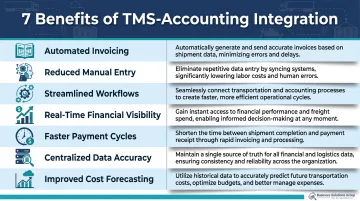
Seven Business Benefits of Integration
| Benefit | What It Delivers |
|---|---|
| Accurate financial records | Freight charges map to GL codes without manual touch |
| Reduced manual workload | Eliminates duplicate data entry across teams |
| Improved efficiency | Finance and logistics work from the same data set |
| Real-time cost visibility | Transportation spend visible as it happens |
| Faster payment cycles | Automated invoicing cuts DSO by days, not hours |
| Eliminated data silos | Single source of truth for freight financials |
| Reliable forecasting | Cost trends surface automatically for budget planning |
Why All-in-One TMS Isn't Always the Answer
Bundled TMS platforms with built-in accounting can seem simpler upfront. In practice, they force compromises: the accounting module isn't as capable as a dedicated platform, and the TMS often lags behind purpose-built dedicated logistics tools. Upgrade decisions become coupled: changing your accounting software means touching your TMS, and vice versa.
Best-of-breed integration preserves team autonomy. Finance keeps the accounting platform they know; logistics gets a TMS built for freight operations. Modern APIs make connecting them faster and less expensive than most businesses expect. Business Solutions Group's TMS advisory work is grounded in this approach: improving pricing and performance while letting clients keep the tools that already work for them.
What Data Flows Between TMS and Accounting Systems
Integration isn't a single data feed. It's a two-way exchange across multiple categories, each with different timing requirements.
TMS → Accounting
- Freight charges: rated shipment costs tied to specific loads
- Carrier invoices: vendor bills for transportation services rendered
- Customer invoices: billing records generated from completed shipments
- Accessorial charges: fuel surcharges, detention fees, reweigh adjustments
- Load-level revenue and cost data: mapped to GL accounts for financial reporting
Accounting → TMS
- Customer credit limits and AR balances: governs load acceptance decisions
- Payment status on carrier settlements: confirms which vendor bills are cleared
- Approved purchase orders: authorizes carrier commitments within budget thresholds
- Budget controls: flags when new loads would exceed approved spend
Real-Time Sync vs. Batch Processing
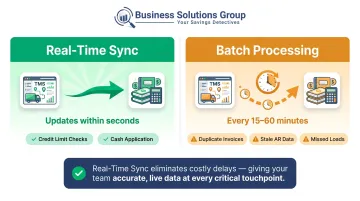
Real-time sync pushes data between systems within seconds. For credit limit checks, this is non-negotiable — if an AR balance updates in the accounting platform, dispatchers need that update immediately, before accepting or declining a load.
Batch processing runs on a schedule — every 15 to 60 minutes — and introduces windows of inaccuracy. A customer payment processed at 9:00 AM may not appear in the TMS until 10:00 AM. In a high-volume environment, that gap is enough to cause duplicate invoices, missed loads, or incorrect credit decisions.
When TMS cost data flows automatically into accounting platforms, financial forecasting becomes faster and more accurate. That automation removes the manual extraction step that makes logistics spend analyses slow — and prone to errors that compound over time.
How TMS and Accounting Software Integrate: Methods and Mechanisms
Three Integration Approaches
Native/pre-built connectors are the fastest path to integration. Many TMS platforms ship with out-of-the-box connectors for popular accounting tools — QuickBooks, NetSuite — that work via authenticated API calls mapping TMS fields to accounting objects. Configuration takes days, not months. The constraint: you're limited to supported platforms, and customization is minimal.
Open API integration gives developers full control. Most modern TMS and cloud accounting platforms expose REST APIs, enabling custom data pipelines with specific GL mappings, multi-entity structures, and carrier payment workflows. This approach handles complex requirements that native connectors can't, but it requires internal development resources or an implementation partner.
Middleware/iPaaS platforms — MuleSoft, Dell Boomi, Zapier — act as a translation layer between systems. They're particularly valuable when one system is older, lacks a modern API, or when the environment spans multiple ERPs or accounting platforms. Middleware supports both real-time and batch models and can handle transformation logic that neither system can do natively. The global iPaaS market is projected to grow from $11.0 billion to $58.1 billion by 2033 — a signal that fragmented tech stacks are the norm, not the exception.
Built-In Accounting vs. Best-of-Breed Integration
A TMS with embedded accounting feels simpler — but that simplicity comes at a cost. Each module constrains the other: the accounting side lacks the depth of a dedicated platform, and the TMS can't evolve independently. When your business outgrows one component, you're forced to replace both.
Separate, integrated systems preserve best-in-class functionality for both logistics and finance teams. An advisory partner can help you evaluate which TMS platforms offer the open API architecture needed to connect cleanly to your existing ERP, WMS, and accounting tools — without ripping out what's already working.
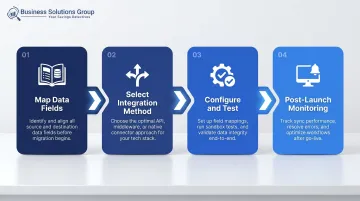
Four-Stage Implementation Process
- Map data fields and GL structure — document every TMS data element that needs an accounting counterpart; build a data dictionary before touching any configuration
- Select the integration method based on your technical resources, budget, and data latency requirements
- Configure and test with sample transactions — run real-world scenarios in a staging environment before go-live and stress-test sync speed
- Establish post-launch monitoring — assign clear ownership for catching sync failures, API breaks after system updates, and new field mismatches
Top Accounting Software Compatible with TMS Platforms
QuickBooks
Holds approximately 62% of US small business accounting market share across more than 7 million businesses. For small-to-midsize freight brokers and carriers, QuickBooks is typically the first accounting platform they use, and TMS integrations are widely available — syncing invoices, driver settlements, IFTA data, and expense categorization.
Its limitations become visible as operations scale. Key constraints to watch for:
- No real-time consolidation across multiple entities
- Multi-currency support requires workarounds
- Integration architecture struggles at high transaction volumes
Growing freight brokerages should map their 12–24 month trajectory before assuming QuickBooks will scale with them.
NetSuite
Oracle's NetSuite is the common upgrade path from QuickBooks for 3PLs and enterprise shippers that have outgrown single-entity accounting. Its open API supports flexible, deep TMS integration — covering invoicing, carrier payments, and cost allocation.
Native multi-currency and multi-entity capabilities make it the standard choice for operations running multiple subsidiaries or cross-border freight. Certified SuiteApp integrations are available for several TMS platforms.
Beyond these two primary options, several platforms serve more specific operational needs or technology ecosystems:
Other Notable Platforms
- Sage Intacct: Holds 17% market share for core accounting among SaaS companies. Strong audit trail, project-level cost accounting, and an established TMS integration via Sage web service APIs (Revenova TMS is listed on the Sage Intacct marketplace). Well-suited for freight operations needing detailed financial controls.
- AccountingSeed: Native Salesforce platform that integrates directly with RevenovaTMS — both run on Salesforce, eliminating the need for middleware entirely. A practical architecture for logistics operations already embedded in the Salesforce ecosystem.
- Microsoft Dynamics 365: Enterprise-grade financial management with a built-in Transportation Management module for carrier invoice reconciliation, rate determination, and cost pass-through to customers. Best suited for complex supply chains requiring ERP-level financial controls.
Common Pitfalls When Integrating TMS and Accounting Software
Data Mapping Errors
The most frequent cause of integration failures isn't technical — it's definitional. Freight charge types in the TMS don't align to GL codes in the accounting system. Accessorial fees that exist in one platform have no matching field in the other. The fix is straightforward but must happen before configuration begins: build a data dictionary that maps every TMS data element to its accounting counterpart, including edge cases like split charges and multi-stop loads.
Attempting to resolve mapping issues after go-live is far more expensive than resolving them upfront.
Underestimating Sync Speed Requirements
Batch-processing integrations that run every hour look fine in testing. In production, that lag causes real problems: credit limit errors, duplicate invoices, missed loads accepted on outdated AR data.
During user acceptance testing, stress-test what happens when a customer payment is applied and a new load request arrives within the batch window. If that scenario breaks, batch processing isn't the right architecture.
Neglecting Post-Launch Maintenance
Integrations break — not because they were built poorly, but because systems change. Common triggers include:
- An accounting platform update that adds a new required field
- A TMS version upgrade that changes an API endpoint
- Schema changes that silently drop or misroute data
Without a designated owner and monitoring protocol, these breaks go undetected until a billing error surfaces in a reconciliation report weeks later.
Business Solutions Group addresses this through ongoing monitoring as part of its client engagements — tracking integration health across both systems so issues are caught before they become billing problems.
Frequently Asked Questions
What is TMS in accounting?
In accounting contexts, TMS refers to a Transportation Management System that feeds freight cost data (carrier invoices, freight charges, and shipping expenses) directly into accounting records. This enables accurate financial tracking, GL cost allocation, and transportation spend reporting without manual data entry.
Can QuickBooks integrate with a TMS?
Yes. QuickBooks integrates with many TMS platforms via native connectors or APIs, typically syncing invoices, carrier settlements, and IFTA data. It's most practical for small-to-midsize freight operators; businesses with multi-entity structures or high transaction volumes may outgrow QuickBooks and move to NetSuite or Sage Intacct.
What data is shared between a TMS and accounting software?
The key data types include customer invoices, carrier payments, freight charges, accessorial fees, GL account codes, AR balances, and customer credit limits. Data flows in both directions — costs from TMS to accounting, and financial controls from accounting back to TMS.
Should accounting be built into my TMS or kept separate?
Separate specialized systems connected via APIs is the stronger long-term architecture. Bundled solutions force trade-offs on both logistics and finance functions — and when one module needs an upgrade, the other gets dragged along. Modern integration tools have made connecting separate systems faster and more cost-effective than earlier middleware approaches.
How long does it take to integrate a TMS with accounting software?
Native connectors can be configured in days. API integrations typically take 4–8 weeks with development resources. Complex middleware projects involving older systems or multi-platform environments may run 2–3 months depending on data volume and mapping complexity.
What is the difference between real-time and batch processing in TMS-accounting integration?
Real-time sync pushes data between systems within seconds — useful for time-sensitive functions like credit limit checks and cash application. Batch processing runs on a fixed schedule and creates windows where the TMS and accounting platform hold different data, which can affect load acceptance decisions and invoice accuracy.