Introduction
ERP, WMS, and TMS systems have become standard fixtures across manufacturing, retail, 3PL, and distribution operations. Most mid-to-large enterprises run all three simultaneously — yet in many organizations, they operate as isolated platforms that don't share data automatically.
The consequences compound quickly. According to Lumenalta, siloed supply chain systems cost companies more than $1.8 trillion annually through manual reconciliation, duplicated effort, and delayed decisions.
The operational failures are specific: orders picked in the WMS may not align with TMS load plans, shipping confirmations may fail to trigger ERP invoicing, and transportation replanning may never reach the warehouse floor in time.
Each of these failures has a root cause in how — or whether — the systems talk to each other. This guide breaks down how TMS integration with ERP and WMS actually works: the data flows that power the order lifecycle, what triggers each exchange, and where poorly designed integrations tend to break down.
Key Takeaways
- TMS integration automates data sharing across ERP, WMS, and TMS throughout the full order lifecycle
- Integration runs in four directional flows, each serving a distinct operational function
- Change management — covering cancellations, quantity shifts, and route resequencing — catches most teams off guard during implementation
- API and EDI are the two main integration methods, each with different strengths for speed and older system compatibility
- Properly connected systems reduce freight costs, eliminate manual errors, and improve on-time delivery performance
What Are ERP, WMS, and TMS — and Why Do They Need to Work Together?
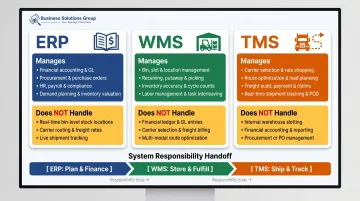
These three systems each own a distinct operational domain:
| System | What It Manages | What It Does NOT Do |
|---|---|---|
| ERP | Financial workflows, procurement, order management (order-to-cash, procure-to-pay) | Does not direct warehouse tasks or optimize freight |
| WMS | Physical warehouse operations — receiving, put-away, picking, packing, shipping | Does not manage carrier selection or transportation routing |
| TMS | Freight movement — routing, carrier selection, load planning, tendering | Does not manage inventory positions or financial transactions |
Why Multi-Vendor Environments Are the Default
ERP systems are typically selected at the corporate level as enterprise-wide platforms. WMS solutions are often chosen separately, driven by the specific complexity of warehouse operations. TMS tools, meanwhile, are picked for logistics optimization — and usually sourced from a third vendor entirely.
Research shows 75% of supply chain leaders still rely on 3 to 10 different systems just to perform basic operational tasks. Multi-vendor environments aren't a temporary workaround — they're the standard operating model for most supply chains.
The Gap That Emerges Without Integration
When these systems run independently, specific operational failures become predictable:
- Products staged near the dock in the WMS don't reflect updated TMS load plans
- Shipping completions don't trigger ERP invoicing, stalling accounts receivable
- Carrier replanning doesn't reach the warehouse floor in time to adjust staging
- Financial reconciliation becomes a manual, error-prone process
At small volumes, these gaps are manageable. As operations scale, they become severe bottlenecks.
How TMS Integration Works: The Four Core Data Flows
TMS integration isn't a single connection point . It's a sequence of directional data exchanges, each serving a specific purpose across both the order-to-cash and procure-to-pay cycles.
Flow 1: ERP to WMS (Initiation)
The process begins when the ERP transmits order data to the WMS. For outbound orders, this means sales order details: product/part numbers, quantities, customer shipping addresses, and required delivery dates. For inbound orders, purchase order data flows to the WMS so it can receive materials against the PO when the vendor delivers.
Master data (vendor records, part numbers, customer addresses) must be pre-loaded into the WMS from the ERP before order processing begins. Without it, the WMS can't match incoming orders to known products or destinations.
Flow 2: ERP/WMS to TMS (Core Operation)
The TMS receives transportation requests containing shipment-critical data:
- Number and type of handling units (pallets, cartons, cases)
- Physical dimensions and weight
- Origin and destination addresses
- Required ship dates and delivery windows
The TMS then runs optimization algorithms across multiple requests simultaneously, grouping orders by shared lanes, destinations, and delivery windows to build load plans. For example, 10 orders might consolidate into 3 optimized truckloads. The TMS recommends specific carrier types, truck sizes, and routes to maximize trailer utilization and reduce cost per unit shipped.
The TMS also manages carrier tendering, dock appointment scheduling, and door reservation — all functions that coordinate directly with warehouse operations.
Flow 3: TMS to WMS (Feedback Loop)
Once load plans are finalized, the TMS pushes that information back to the WMS so warehouse staff can coordinate picking, staging, and truck-loading sequences correctly.
Multi-stop loads require particular attention here. The WMS must know the stop sequence because freight for the last delivery stop must be loaded first. If this data doesn't flow from TMS to WMS before picking begins, loads are staged incorrectly and trucks have to be partially unloaded and repacked at the dock — a costly disruption that's entirely avoidable.
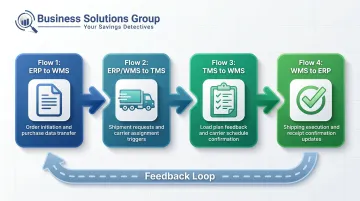
Flow 4: WMS to ERP (Confirmation)
Once warehouse execution is complete, that operational confirmation triggers the financial close. The final flow works in two directions:
- Outbound shipments: The WMS sends a shipping confirmation to ERP, updating the sales order status to "shipped" and triggering accounts receivable and invoicing workflows
- Inbound receipts: The WMS sends a receipt confirmation to ERP, triggering accounts payable processing against the original purchase order
Without this flow, financial workflows stall. Invoices don't generate on time, reconciliation becomes manual, and AR aging reports become unreliable.
What Happens When Plans Change: Integration and Change Management
Basic connectivity handles steady-state operations. The real test of integration quality is how the system handles real-world revisions.
Common changes that occur after orders are created:
- Order cancellations
- Quantity increases or decreases
- Requested ship date changes
- Delivery address corrections
- Stop sequence resequencing on multi-stop loads
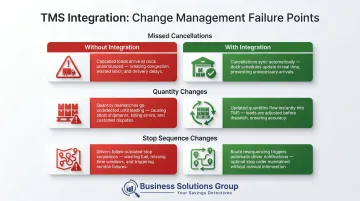
Each change must propagate immediately from ERP to both WMS and TMS. When propagation fails, the downstream effects are concrete and costly.
Missed Cancellations
If an order is canceled in ERP but the WMS isn't notified, product remains staged near the dock, occupying prime warehouse space that should be freed for active shipments. Over time, uncommunicated cancellations create dock congestion and force staff to physically audit staged freight to identify what still has an active load plan.
Quantity Changes and Load Planning Failures
If a customer increases their order from 8 pallets to 14 pallets three days before shipping but the TMS isn't updated, the load plan remains sized for the original quantity. Warehouse staff discover the discrepancy at loading time, not during planning. The result: last-minute replanning, driver delays, delivery failures, and carrier detention charges.
In a well-integrated system, the TMS automatically regenerates the load plan when the quantity change is received, before picking begins. The warehouse adapts to the correct plan, not the outdated one.
Stop Sequence Changes After Loading Begins
Quantity errors surface at the dock — sequencing errors surface inside the trailer. If a multi-stop load is resequenced in the TMS after the WMS has already begun staging freight, product may be loaded in the wrong order for the new stop sequence. A well-built integration addresses this with real-time status validation: the TMS checks whether loading has started before allowing stop sequence modifications, and alerts operations teams when manual intervention is required.
The key principle: exceptions identified during implementation design are problems you solve once. Exceptions discovered in production are problems you solve under pressure, repeatedly. Building exception logic into the integration upfront means your team spends time on planned operations, not unplanned firefighting.
The Real Business Impact of a Connected System
When ERP, WMS, and TMS systems share data in real time, the operational gains show up quickly — in freight costs, labor hours, and the delivery experience customers actually notice.
Operational Outcomes
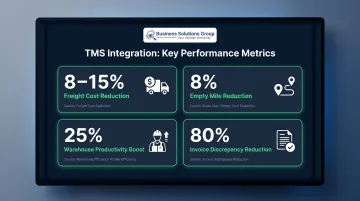
- Freight cost reduction: ARC Advisory Group reports organizations implementing TMS achieve 8% to 10% freight cost savings; Gartner cites a range of 5% to 15% freight spend reduction
- Empty mile reduction: Giant Eagle reduced empty miles by 8% and total miles driven by 7.7% after TMS implementation (Manhattan Associates)
- Productivity gains: Warehouses that unify data across WMS, TMS, and ERP systems can see a 25% productivity boost, primarily through eliminated redundant data entry
- Invoice accuracy: Companies using TMS reduce invoice discrepancies by up to 80%, according to APQC data
Faster order cycle times follow directly from automated hand-offs replacing manual queuing between systems. Real-time inventory data feeding TMS optimization means load planning reflects what's actually in stock when the shipment is scheduled — not what existed when the order was created. That accuracy carries through to the customer experience as well.
Customer-Facing Impact
PwC research cited by LoginExt found that 73% of consumers say a positive delivery experience influences brand loyalty. Integrated systems make that experience more achievable: accurate delivery windows become the default, proactive delay notifications replace reactive apologies, and the gap between a fulfillment exception and an operations response shrinks considerably.
From Integration to Freight Cost Intelligence
Integration creates something beyond operational efficiency: clean, comprehensive shipping data. When ERP, WMS, and TMS share data automatically, organizations accumulate shipment-level records that reveal carrier performance patterns, lane-specific cost trends, and rate contract compliance — details that are nearly impossible to analyze accurately from disconnected systems.
Business Solutions Group's spend intelligence platform consolidates this integrated shipping data into dashboards that identify what carriers rarely flag proactively: accessorial overcharges, rate misapplications, and contract discount gaps. Their supply chain optimization advisory benchmarks freight rates against market standards and surfaces carrier contract inefficiencies — turning the data produced by a connected system into direct cost recovery.
API vs. EDI: Choosing Your Integration Method
TMS integration is implemented through one of two technical approaches — or a combination of both.
Comparison at a Glance
| Factor | EDI | API |
|---|---|---|
| Data transmission | Batch; typically 30–60 minute delays | Real-time; instantaneous |
| Standards | X12, EDIFACT via AS2/FTP | REST, SOAP over HTTPS |
| Flexibility | Limited to predefined document types | Nearly unlimited customization |
| Legacy compatibility | Strong — widely supported by older ERP/WMS platforms | Requires modern system support |
| Best for | High-volume recurring transactions with large retail/carrier partners | Real-time tracking, order changes, live inventory updates |
| Current adoption | ~85% of supply chain data still flows via EDI | $1.48B market in 2023, growing at 20.2% CAGR |
How to Choose
According to Agistix, approximately 85% of supply chain data still flows through EDI systems, even as API adoption accelerates rapidly. The practical implication: most modern supply chains need both.
Choose EDI when:
- Your ERP or WMS is a legacy platform with limited API support
- Specific trading partners or carriers require EDI compliance
- Transaction volumes are high and document types are stable and standardized
Choose API when:
- You need real-time order change propagation between systems
- Shipment status updates must flow instantly to customer-facing applications
- You're onboarding new partners frequently and need faster integration cycles
Use both when carrier communication runs on EDI while internal system-to-system exchanges (ERP ↔ WMS ↔ TMS) use APIs. This hybrid approach is the emerging standard for most mid-to-large supply chain environments.
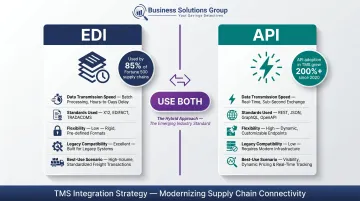
Business Solutions Group's TMS supports a RESTful API for modern ERP integrations and pre-built connectors for common platforms, so it adapts to whichever approach your existing infrastructure already uses.
Frequently Asked Questions
What is TMS integration and can it integrate with ERP and WMS?
TMS integration connects a Transportation Management System with ERP and WMS to enable automated data sharing across the order lifecycle. ERP handles financial workflows and order creation, WMS manages warehouse execution, and TMS optimizes freight movement between warehouse and destination.
What are ERP, WMS, and TMS systems?
ERP manages enterprise-wide financial processes (procurement, invoicing, order management). WMS controls warehouse operations — receiving, inventory, picking, and shipping. TMS optimizes freight movement through routing, carrier selection, load planning, and shipment tracking.
What is the difference between TMS and WMS?
WMS manages operations inside the warehouse — inventory positions, picking tasks, staging, and dock activity. TMS manages operations outside the warehouse — carrier selection, freight routing, load planning, and shipment tracking.
What is the difference between ERP and TMS?
ERP is the enterprise backbone managing financials, procurement, and order management across the business. TMS is a specialized logistics tool focused on transportation execution. In the integration flow, TMS receives order data from ERP and returns shipping confirmations that trigger ERP's invoicing and accounts receivable workflows.
What is TMS in supply chain management?
TMS (Transportation Management System) is software that plans, executes, and optimizes the physical movement of goods — covering route optimization, carrier selection, load planning, freight audit, and shipment tracking. It functions as the transportation execution layer of the supply chain, connecting warehouse departure to final delivery.
What is a TMS invoice?
A TMS invoice (also called a freight or carrier invoice) is the billing document generated after shipment execution. TMS platforms automate freight audit by matching carrier invoices against contracted rates and flagging discrepancies before payment — critical given that 22% of freight invoices contain errors, costing an average of $53.50 per error to resolve manually.