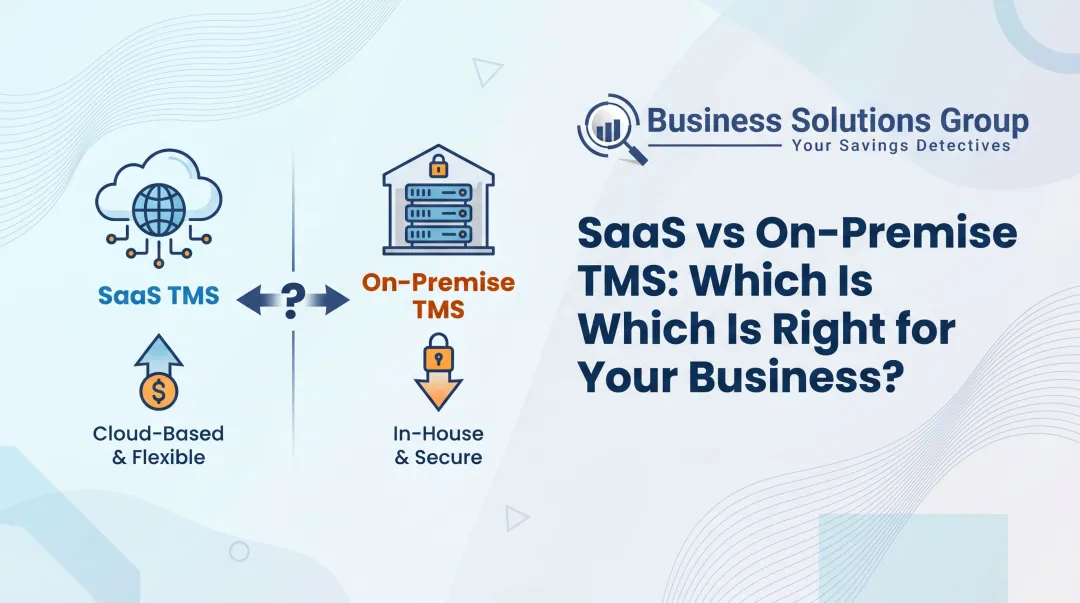
The core tension is straightforward: cloud-based TMS offers faster deployment and lower upfront costs; on-premise TMS offers greater control and customization. But the "right" answer depends on your business size, IT capacity, and compliance requirements.
The market is clearly moving in one direction. According to Grand View Research, the global TMS market is projected to grow from $21.8 billion in 2026 to $68.4 billion by 2033—and the cloud segment is expected to register the highest growth rate throughout that period. Cloud TMS isn't a trend; it's where the industry is headed.
This article breaks down both deployment models, compares them across five critical dimensions, and helps you determine which approach fits your operation.
Key Takeaways
- Cloud TMS is hosted on vendor servers; on-premise TMS runs on your own hardware
- Cloud deployments typically go live in 1–4 weeks; on-premise can take 6–18 months
- On-premise adds hidden costs: hardware, IT staffing, and backup power all drive up total cost of ownership
- Regulated industries (defense, healthcare, government) remain the primary use case for on-premise
- For most small-to-mid-size shippers, cloud TMS delivers faster ROI and lower overhead
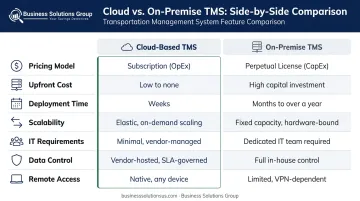
Cloud-Based TMS vs On-Premise TMS: Quick Comparison
Before diving into the details, here's how the two models stack up across the dimensions that matter most:
| Dimension | Cloud-Based TMS | On-Premise TMS |
|---|---|---|
| Pricing Model | Monthly subscription (SaaS) | One-time license + hardware purchase |
| Upfront Cost | Low—no hardware required | High—servers, licenses, infrastructure |
| Deployment Time | 1–4 weeks | 6–18 months |
| Scalability | On-demand; adjust subscription as needed | Requires hardware upgrades to scale |
| IT Requirements | Minimal; vendor manages updates and patches | Dedicated IT team required |
| Data Control | Managed by vendor with compliance certifications | Full in-house control behind your firewall |
| Remote Access | Native; browser-based from any device | Limited without additional configuration |
Cost
Cloud TMS operates on a subscription model—you pay monthly, there's no hardware investment, and costs are predictable. On-premise requires upfront capital for servers, software licenses, and implementation, plus ongoing IT staffing, maintenance contracts, and infrastructure upkeep.
The gap widens when you account for hidden on-premise costs that rarely appear in the initial budget:
- Backup power systems and server cooling
- Redundant internet connections
- Emergency IT support contracts
- Infrastructure refresh cycles (typically every 3–5 years)
These expenses surface in year two and beyond, often catching finance teams off guard.
Deployment Time
According to Cargoson, cloud TMS implementations typically take 1–4 weeks, compared to 6–18 months for traditional on-premise systems. A real-world example: Doosan Bobcat North America migrated from on-premise Oracle Transportation Management to the cloud in just 11 weeks, according to Capgemini's case study.
Scalability
Cloud TMS scales with a few clicks—add users, modes, or capacity by adjusting your subscription tier. On-premise scaling means procuring additional hardware and engaging IT resources—a process that introduces lead time and capital expenditure precisely when your operations can least afford delays.
What Is a Cloud-Based TMS?
A cloud-based TMS is transportation management software hosted on a vendor's remote servers and accessed through a web browser. No local installation, no on-site hardware. Users log in from any device, from any location, and the vendor handles all backend maintenance.
Core operational benefits include:
- Automatic updates — the system stays current without scheduled downtime or manual patching
- Open APIs and pre-built integrations — connects with ERP, WMS, and order management systems without custom development
- Real-time analytics — freight cost and carrier performance data appear immediately, not in batch reports
- Multi-location access — teams in different facilities or time zones work from the same system simultaneously
SaaS vs. Cloud TMS: A Quick Clarification
These terms are often used interchangeably, but there's a distinction worth noting. All SaaS TMS solutions are cloud-based, but not every cloud-based TMS is SaaS. Some large enterprises host their own software on leased cloud infrastructure, giving them cloud's scalability without using a vendor's multi-tenant environment. For most shippers, the practical difference is minor, but it matters when evaluating data residency options.
Who Cloud TMS Is Best For
Cloud TMS tends to deliver the strongest fit for:
- Small-to-mid-size shippers with limited internal IT staff
- Businesses operating across multiple locations or with remote teams
- E-commerce companies managing high parcel volumes with variable demand
- Operations that experience seasonal demand spikes and need elastic capacity
These use cases translate directly into measurable outcomes. When a global automaker deployed a cloud-based TMS through Cargobase, the company achieved 25% cost avoidance in premium freight. Office Depot's migration from on-premise TMS to Oracle Cloud SaaS produced reduced infrastructure costs, faster archive performance, and improved reporting visibility.
What Is an On-Premise TMS?
An on-premise TMS runs on servers physically located at your facility — not a vendor's cloud. Your IT team owns everything: installation, configuration, updates, security, and maintenance. You can license a vendor platform, build custom, or buy a base system and modify it heavily.
Core Advantages
- Data stays on your own infrastructure — no third-party servers involved
- Workflows, integrations, and reporting are fully customizable without vendor constraints
- Internal operations continue during internet outages
- Environment can be configured to meet specific compliance frameworks (HIPAA, ITAR, FedRAMP)
The Real Cost Picture
Those advantages carry costs that many organizations underestimate:
- High upfront hardware and software license costs
- Ongoing IT staffing to manage maintenance and upgrades
- Responsibility for backup power, server cooling, and redundant connectivity
- Full accountability for security—any breach is entirely your problem to manage and remediate
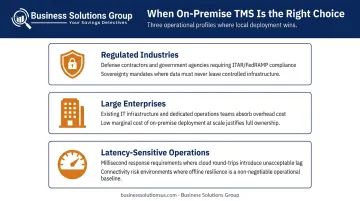
When On-Premise Still Makes Sense
On-premise TMS remains the right call in specific scenarios:
- Regulated industries with strict data residency requirements: defense contractors, government agencies, and financial institutions subject to ITAR or FedRAMP
- Large enterprises with existing IT infrastructure and dedicated ops teams, where adding TMS carries low marginal cost
- Latency-sensitive operations where millisecond response times are required and cloud connectivity introduces unacceptable risk
Which TMS Deployment Model Is Right for Your Business?
The decision comes down to five factors: total cost of ownership, internal IT capacity, integration complexity, compliance obligations, and growth trajectory.
Decision Framework
Choose cloud TMS if:
- You're a small-to-mid-size shipper without a large IT team
- You need to go live quickly—weeks, not months
- Predictable monthly costs matter more than maximum customization
- You operate across multiple locations or need remote access
- You expect volume growth or seasonal demand variability
Choose on-premise if:
- Your industry has strict data residency or sovereignty requirements
- You already have robust IT infrastructure and dedicated teams
- Maximum software customization is non-negotiable for your operations
- Your regulatory environment prohibits third-party data hosting
The Hidden Cost Problem with On-Premise
The sticker price of an on-premise TMS license understates the real investment. Once you add hardware procurement, implementation services, IT staffing, annual maintenance contracts, backup power systems, server cooling infrastructure, and redundant internet connections, total cost of ownership climbs substantially above the initial quote.
Office Depot's migration from on-premise Oracle TMS to cloud directly addressed this—the move reduced infrastructure operating expenses and maintenance costs while improving reporting and analytics visibility. Bobcat's transition produced predictable licensing costs through subscription pricing, replacing unpredictable capital expenditures.
A Real-World Migration Example
Consider a mid-size freight shipper running an on-premise TMS installed five years prior. The original system was customized heavily for their workflows—but over time, the cracks appeared. Scaling for peak season required hardware procurement that took weeks. Adding a new warehouse location meant IT configuration projects that stretched across months. Carrier performance data lived in separate reports that required manual consolidation.
The decision to migrate wasn't driven by technology enthusiasm—it was driven by escalating IT maintenance costs, inability to support remote teams during a period of rapid expansion, and the operational pain of operating without real-time visibility across locations. The cloud migration resolved all three pain points and went live in under three months.

Where Business Solutions Group Fits
Migrations like the one above rarely fail on technology—they fail when the financial case isn't built before the project starts. For shippers evaluating TMS deployment as part of a broader cost initiative, Business Solutions Group benchmarks current freight spend, assesses carrier contract performance, and models ROI across operational scenarios—including TMS deployment options. The goal is a clear financial picture so the technology decision is grounded in measurable outcomes, not assumptions.
Conclusion
Cloud-based TMS is the right fit for the majority of shippers today. Faster deployment, predictable costs, built-in scalability, and vendor-managed security make it the practical choice for businesses that need to move quickly and grow without IT constraints. On-premise remains a legitimate option for organizations with strict compliance requirements or substantial existing IT infrastructure—but that window is shrinking.
That decision carries real operational weight. Freight cost visibility, carrier contract performance, and how fast you can respond to disruptions all depend on deploying a TMS that fits your actual environment—not the one you plan to have. If you're evaluating TMS options as part of a broader logistics cost reduction initiative, Business Solutions Group's supply chain optimization services can help you benchmark your current spend and build the financial case before you commit.
Frequently Asked Questions
What is a cloud-based TMS?
A cloud-based TMS is transportation management software hosted on a vendor's remote servers and accessed through a web browser. No local hardware installation is required. The vendor manages all infrastructure, updates, and security, and users access the system from any device with internet connectivity.
What are the advantages and disadvantages of cloud-based TMS versus on-premise TMS?
Cloud TMS offers lower costs, faster deployment, automatic updates, and native scalability—but relies on internet connectivity and gives less direct control over data. On-premise TMS provides maximum control, customization, and data sovereignty, but requires significant upfront investment and dedicated IT resources to maintain.
How much does a cloud-based TMS cost compared to on-premise?
Cloud TMS uses a monthly subscription model with minimal upfront costs. On-premise TMS involves one-time licensing fees, hardware procurement, implementation costs, and ongoing IT maintenance, making total cost of ownership considerably higher once all infrastructure costs are included.
Is cloud-based TMS secure enough for enterprise logistics?
Leading cloud TMS providers maintain enterprise-grade security with certifications including ISO 27001, SOC 2 Type II, and regular third-party audits. For most organizations, vendor infrastructure exceeds what in-house IT teams can sustain, though highly regulated industries should evaluate specific data residency requirements.
What industries are best suited for on-premise TMS?
Defense contractors, government agencies, financial institutions, and certain healthcare organizations with strict data sovereignty or regulatory compliance requirements are the primary use cases where on-premise TMS retains a clear advantage over cloud alternatives.
How long does it take to implement a cloud-based TMS?
Cloud TMS deployments typically take 1–4 weeks, requiring only internet access and credentials. On-premise implementations can take 6–18 months due to hardware procurement, infrastructure configuration, and IT setup.